At Pelogic, we've adopted a fundamentally different approach - one that treats software architecture as a first-class concern from day one. The results speak for themselves: faster development cycles, dramatically reduced maintenance costs, and codebases that remain comprehensible years after initial development.
This article shares the architectural principles we apply to build CAD plugins that scale across time, across teams, and across platforms.
The Hidden Cost of Traditional CAD Plugin Development
Most CAD plugins evolve organically. A developer adds a button. The click handler calls a Revit API method directly. The view model references ElementId and Document types. Business logic gets scattered across UI components. It works initially.
But the cost compounds over time in ways that aren't immediately visible:
- API Update Fragility: A single Revit API change ripples through dozens, sometimes hundreds of files. What should be a minor version bump becomes a multi-week refactoring project.
- Testing Paralysis: Every test requires a running Revit instance, making automated testing impractical. Bugs slip into production because comprehensive testing is too slow and expensive.
- Platform Lock-in: Porting functionality to AutoCAD or other platforms means rewriting from scratch. The same business logic gets implemented multiple times, each with its own bugs.
- Onboarding Friction: New team members spend weeks understanding the dependency maze before contributing meaningful code. Knowledge silos form around developers who understand specific subsystems.
What Tight Coupling Looks Like
In a typical tightly-coupled architecture every layer directly depends on Revit API types:
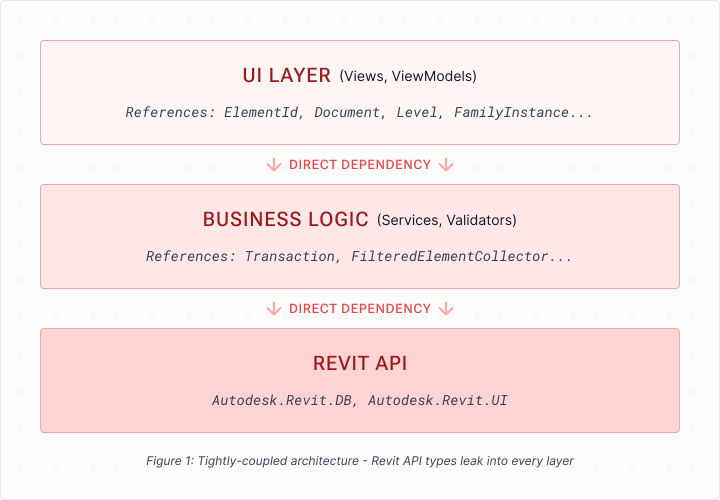
The problem isn't that this code doesn't work, it does. The problem is that the entire codebase becomes highly dependant on the Revit API. Every layer knows about Revit types, which means every layer breaks when those types change.
Our Approach: Platform-Agnostic Layered Architecture
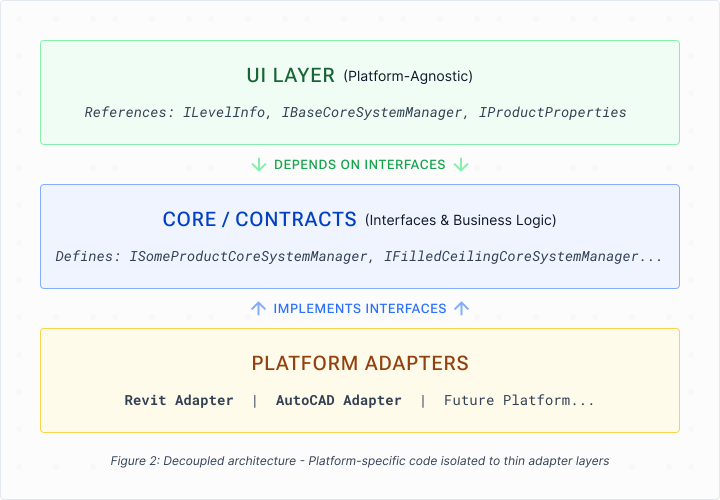
We structure our plugins with strict separation between layers, following principles borrowed from enterprise software architecture:
The Three-Layer Model
UI Layer
Views and view models that know nothing about Revit or AutoCAD. They work with abstractions like
ILevelInfo instead of Autodesk.Revit.DB.Level. This layer is entirely platform-agnostic and can be compiled without any CAD SDK references.Core Business Logic
Validation rules, calculations, state management, database operations - pure C# with no CAD dependencies. This layer defines interfaces that the platform adapters must implement, inverting the traditional dependency direction. Fully unit-testable without launching any CAD application.
Platform Adapters
Thin translation layers that implement our interfaces using the actual Revit or AutoCAD APIs. This is the only code that touches platform-specific types. When APIs change, this is where we make surgical updates not scattered throughout the codebase.
The Decoupled Architecture
The Key Principle: Dependency Inversion
The critical insight is that dependencies flow upward toward abstractions, not downward toward implementations. The UI layer doesn't depend on Revit, the Revit adapter depends on interfaces defined in the core layer.
This means:
- The UI layer can be compiled, tested, and even run (with mock adapters) without any CAD SDK installed
- Business logic is platform-agnostic by design, not by accident
- Adding a new platform means writing a new adapter, not rewriting the application
A Concrete Example: Level Information
Let's look at a real example from a ceiling design plugin. The UI needs to display available building levels so users can select where to place ceiling elements.
Before: Tightly Coupled
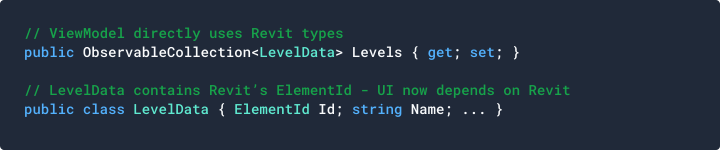
The view model directly uses
LevelData, which contains ElementId - a Revit-specific type. The UI project now requires a reference to the Revit SDK.After: Properly Decoupled
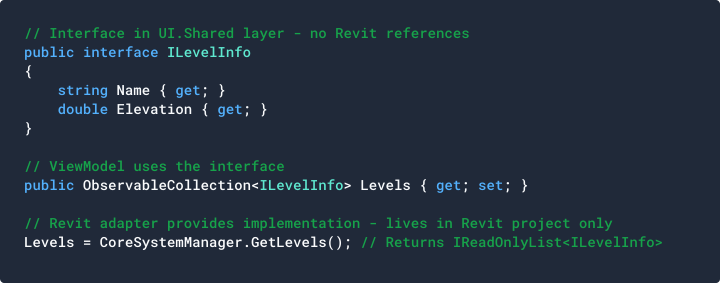
The Revit project implements
ILevelInfo with a class that internally holds the ElementId, but the UI never sees it. The view model remains completely platform-agnostic.What This Actually Solves (And What It Doesn't)
Let me be direct about the benefits and limitations of this architecture
What It Solves
- Isolated API Breakage: When Autodesk changes an API, you know exactly where to look. The breakage is confined to adapter files, not scattered across your entire codebase. Fixes are surgical, not catastrophic.
- Real Multi-Version Support: You can support Revit 2022, 2023, 2024, 2025, and 2026 with version-specific adapters while sharing over 80% of your code. The UI and business logic compile once; only the adapters vary.
- Practical Multi-Platform Development: When a client asks for AutoCAD support, you're not starting over. Write new adapters, wire up dependency injection, and the core application runs on a new platform.
- Testable Business Logic: Unit tests run in milliseconds without launching Revit. Mock your interfaces and test validation rules, calculations, and state management in isolation.
- Reduced Ripple Effect: In tightly coupled code, one API change touches 50+ files. In decoupled code, it touches 2-3 adapter files. Code reviews become manageable.
What It Doesn't Solve
This architecture doesn't make Revit API changes disappear. When Autodesk deprecates a method or changes behavior, you still need to update your code. What changes is where and how much code you need to update.
This approach also requires more upfront design effort. You need to think carefully about interface boundaries, dependency injection, and layer responsibilities. Not every project justifies this investment.
When This Approach Makes Sense
This architecture is ideal for:
- Plugins that need to survive multiple years of Revit/AutoCAD updates
- Projects targeting multiple CAD platforms (Revit + AutoCAD, or future platforms)
- Enterprise applications where testing and maintainability are priorities
- Teams larger than 2-3 developers who need clear boundaries and contracts
- Products where the UI will evolve independently of the CAD integration
- For a quick prototype or single-version internal tool, the overhead may not be justified. We choose our architecture based on project requirements, not ideology.
Final Thoughts
CAD plugin development doesn't mean constant firefighting. With deliberate architectural choices - separating concerns, inverting dependencies, and isolating platform-specific code - you can build applications that remain maintainable as they grow and evolve.
At Pelogic, we've applied these principles across some of our projects. The result: plugins that adapt to API changes without panic, support multiple platforms without duplication, and welcome new team members without lengthy onboarding.

Shalva
Software Architect