Why AEC Software Projects Aren’t Like Any Other Project
AEC tools like Revit, AutoCAD, and Civil3D were built to solve incredibly complex design and
engineering problems. They are not open, lightweight platforms, they are massive ecosystems with
layers of geometry, data, and standards.
That means building custom software for this space requires:
⦁ Domain understanding. It’s not enough to know C# or .NET. Developers need to understand what a wall, family, or parametric constraint means in Revit, or how alignment and surfaces work in Civil 3D. Otherwise, the solution may work technically but fail practically for end users.
⦁ Integration over isolation. AEC software rarely lives alone. Your plugin needs to fit into a workflow that includes BIM models, clash detection, project templates, and maybe even downstream IFC or COBie deliverables.
⦁ Precision and reliability. Unlike consumer apps, where a small glitch is annoying, in AEC tools it can mean hours of rework on a model that dozens of people depend on.
In short: AEC software isn’t just about coding, it’s about translating engineering workflows into
reliable tools.
The Hidden Challenges of Autodesk Plugin Development
Even once you have the right technical and domain expertise, Autodesk plugin projects bring their
own set of obstacles. Here are some of the most common ones clients should be aware of:
Version Compatibility
Every year, Autodesk releases new versions of Revit, AutoCAD, and Civil 3D. Unlike many software
ecosystems where an app might continue to run after an upgrade, Autodesk plugins won’t work in a
newer Revit release unless support is explicitly added by the development team.
That’s why plugins are typically built to support all currently supported versions in parallel. This
means developers must maintain, test, and package multiple builds in a single installer, allowing
end-users to run the plugin regardless of which version their company is using.
Real-world example: Autodesk introduced significant platform changes with Revit 2025 release,
most notably moving from the .NET 4.8 Framework to .NET 8.0, which required additional research and
architectural changes to the pipeline to handle both environments - keeping support for older
versions like Revit 2021 (running on .NET 4.8) while adding compatibility for Revit 2025 on .NET
8.0. Today, USG Ceiling Technix™ supports Revit 2022–2026, reflecting Autodesk’s rolling support
window.
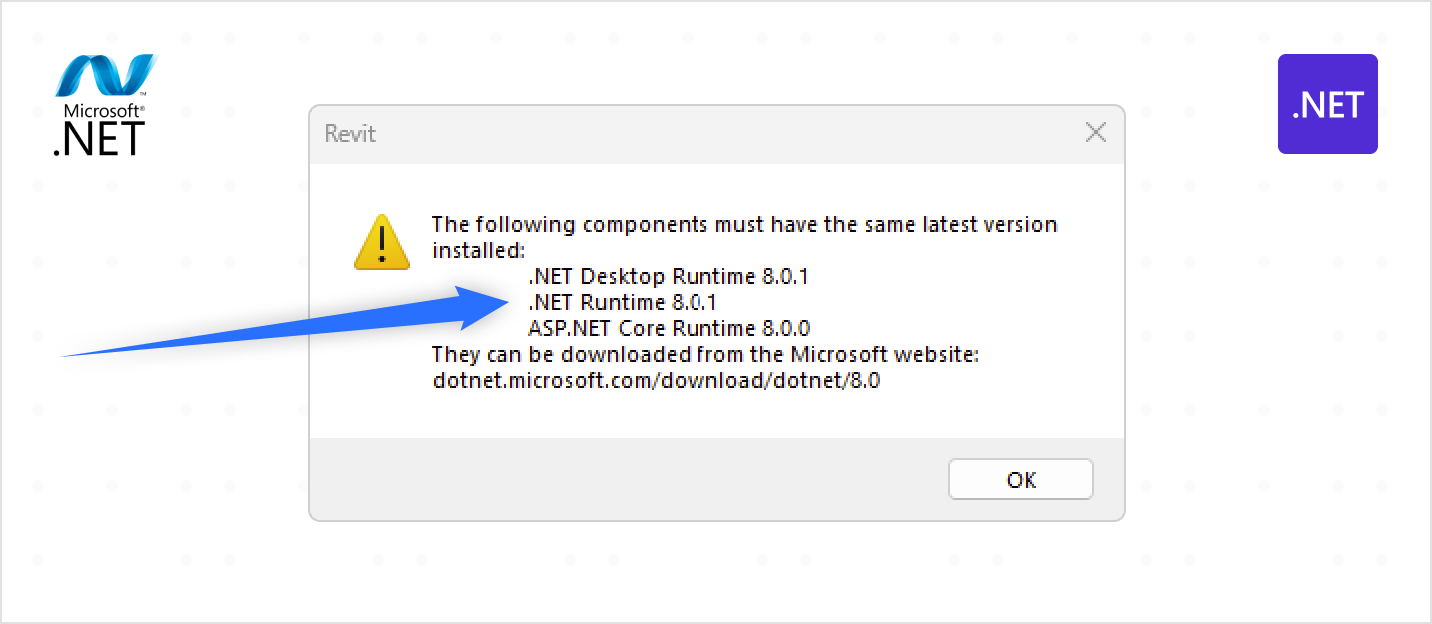
As with most new releases, we also encountered a bug in Revit 2025 itself, which we reported to Autodesk. These kinds of issues are not unusual right after a new Autodesk version goes live, and they rarely block development because workarounds are usually possible. In this case, we prepared a backup plan, but Autodesk resolved the issue quickly in Revit 2025.2, making the workaround unnecessary.
That’s why we often recommend a pragmatic approach: supporting a new Revit release can be postponed
by a few months, until Autodesk’s first updates stabilize the platform and address the most critical
bugs. This ensures clients get a reliable solution, without paying for rework caused by
early-release issues.
The takeaway is simple: Supporting multiple Autodesk versions is not an exception - it’s the
standard expectation. Planning for ongoing updates and maintenance is a core requirement of any
serious AEC plugin project.
Updates That Break Things
Even small changes in Autodesk’s updates can break existing plugins. A delivery manager has to plan
for maintenance and communicate this clearly to clients from day one.
Real-world example: At one point, Autodesk updated the supported CefSharp version in Revit. On
the surface, this seemed like a minor technical change, but the impact was unexpected - YouTube
videos embedded in our plugin’s onboarding process stopped working overnight. Users suddenly
couldn’t access the tutorial materials they relied on, which disrupted adoption for new teams.
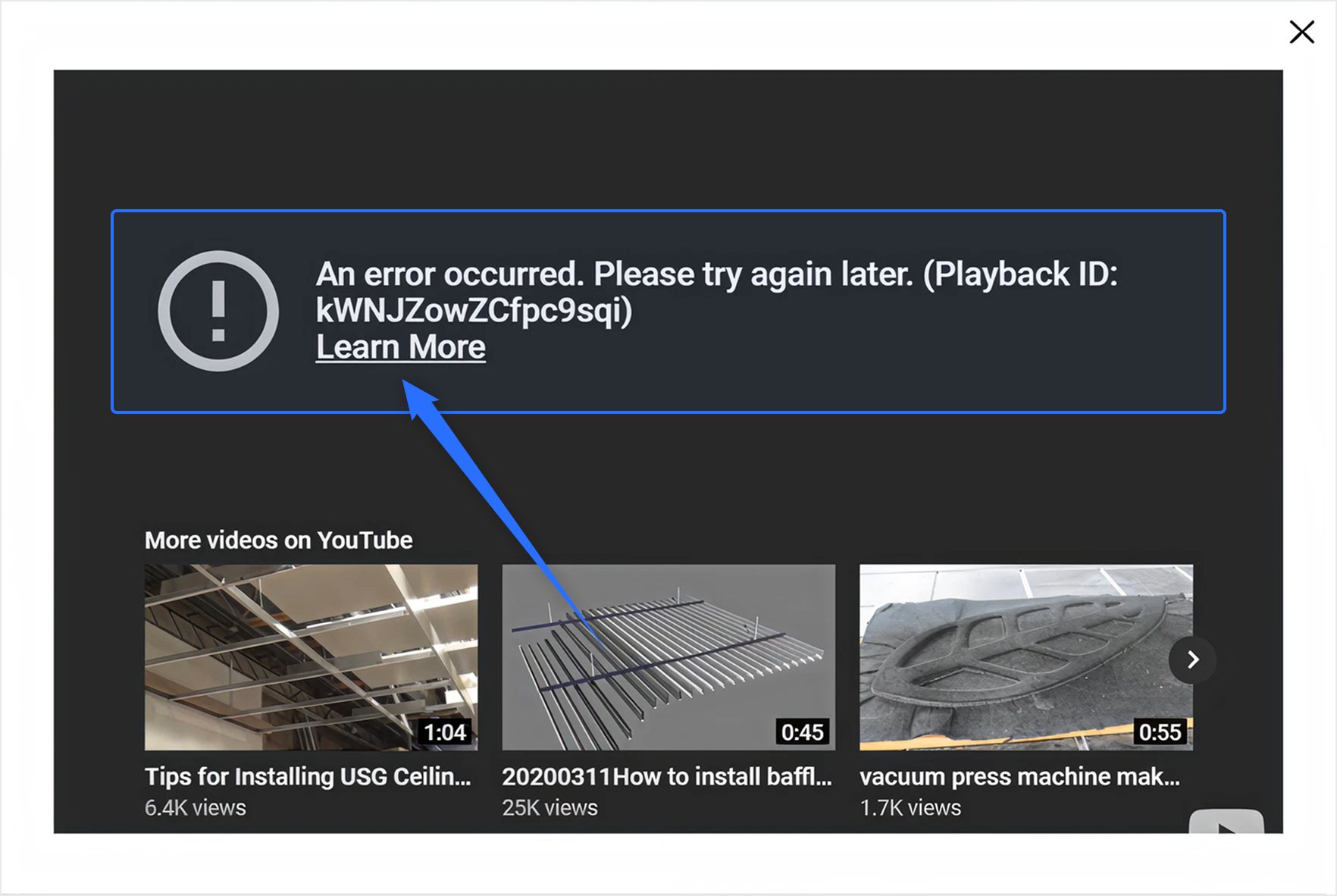
To resolve this, we shifted from embedding videos directly inside Revit to opening them in the user’s default browser. This approach made the tutorials more reliable, less dependent on Revit’s internal browser settings, and easier to maintain in the long run.
This is why even “small” Autodesk updates must be treated seriously during delivery planning.
Data Standards (IFC, COBie, etc.)
Compliance with open data standards is a recurring requirement in AEC projects. Owners, contractors,
and governments often specify deliverables in formats like IFC, COBie, or require models to meet
certain Levels of Development (LOD). While the need is clear, actually meeting these standards in
Autodesk plugins can be more complicated than it seems.
The main difficulty is that Autodesk’s APIs don’t always provide full support for every schema or
standard. IFC, for example, is an evolving open format with frequent updates. What works in one
version may not be fully compatible in another, and some expected data fields may not even be
exposed through the Revit API. The same goes for COBie exports, which demand very specific naming
conventions and attribute mappings that don’t always align neatly with Revit’s internal data
structures.
Real-world example: On one project, we needed to ensure that construction elements were exported
correctly into an IFC schema for coordination with external tools. While Revit supported a basic IFC
export, key metadata fields were missing. This required custom handling: extending Revit parameters,
mapping them manually to IFC property sets, and implementing a custom export routine to ensure all
required data was captured. Without this, the exported model would have passed a visual check but
failed compliance validation.
The takeaway is simple: Meeting data standard requirements goes beyond “just exporting.” It often
requires custom development, schema mapping, and additional QA to ensure deliverables are truly
compliant. Clients should plan for this effort early, since aligning Autodesk plugins with open
standards is rarely a plug-and-play process.
Performance Considerations
Large BIM models can contain thousands of elements. A plugin that runs fine on a test model may take
hours (or crash) on a real production file if performance isn’t optimized.
Real-world example: We ran into this issue with a Revit plugin for trimming ceiling cassettes
while developing USG Ceiling Technix™ functionalities. On small ceilings, the process worked fine,
but when we tried tried to create a ceiling containing thousands of cassettes or baffles,
performance was painfully slow.
Standard optimization efforts helped somewhat, but the real breakthrough came when we rethought how
data was stored in the entity storage. Instead of saving information for every single cassette, we
shifted to storing a single entity and applying it across the entire generated ceiling. This reduced
redundancy, minimized memory usage, and dramatically improved overall speed.
In parallel, the client also asked for the plugin to be made platform independent, which opened the
door to rethink the approach. Instead of relying on Revit’s geometry engine, we developed our own
custom geometry engine and trimming algorithm. This drastically reduced processing time and gave us
full control over performance tuning, regardless of the Revit version or platform constraints.
The result was a solution that not only met the client’s vision of cross-platform capability but
also turned a once time-consuming process into a much faster and more reliable workflow.
Localization and units
One of the less obvious challenges in Autodesk plugin development is localization. It’s not just
about translating buttons or menus — the plugin also has to work correctly in different languages
and measurement systems.
Real-world example: many Canadian users run Revit in French, where projects default to metric.
USG Ceiling Technix™ plugin defines a minimum offset of 0' 4" for one of the ceiling types, which
should convert cleanly to 10.16 cm (0.1016 m). But here’s where things got tricky: Revit rounded the
number, told users the minimum was 0.10 m, and then refused to accept that value when they tried it.
The result? Confusing error messages and a blocked workflow — all because of a small rounding issue
between imperial and metric units.
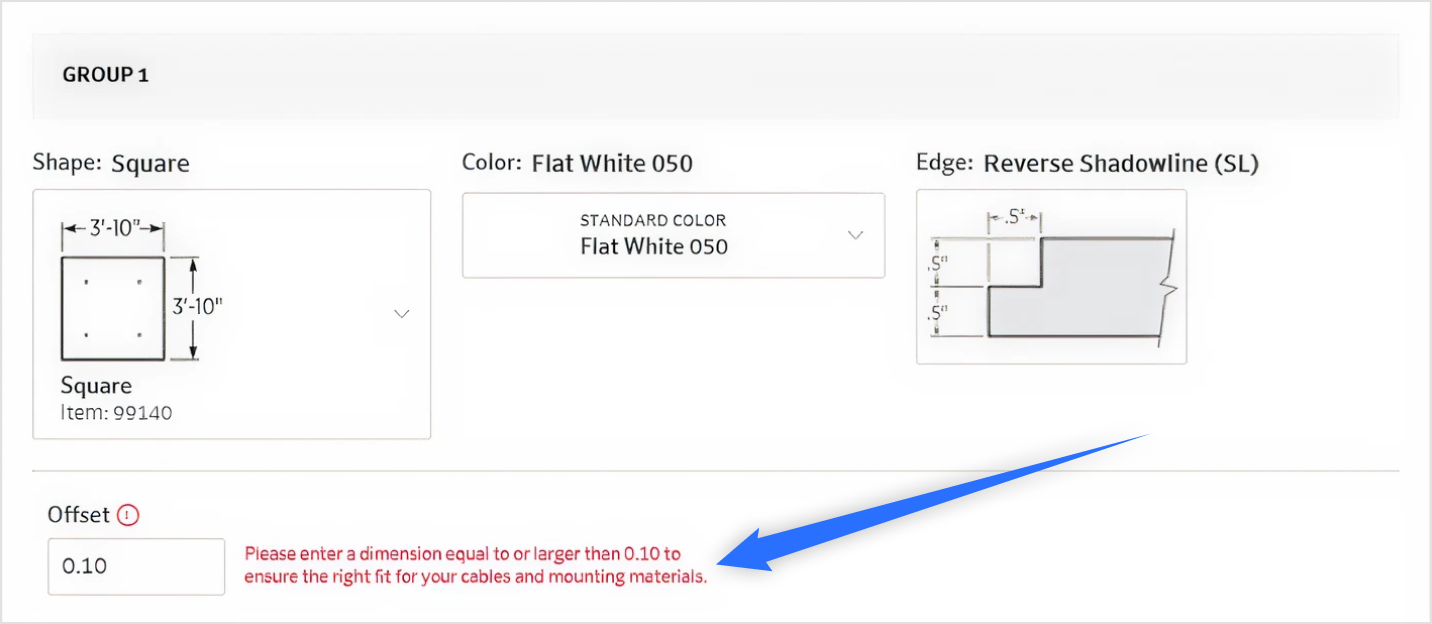
The lesson: localization isn’t only about language. Units, conversions, and error handling need just as much attention to make sure the plugin works smoothly for every region and every user.
What This Means for Clients
If you’re considering building a plugin or a web solution connected to Autodesk products, here are
three takeaways from our experience:
⦁ Plan for the long term. Don’t treat your plugin as a one-off tool — expect to update it with each Autodesk release.
⦁ Invest in discovery. The more detail you share about your workflows, the easier it is for the development team to design a plugin that really fits your needs.
⦁ Choose a partner who understands AEC. A generalist software team can write code, but without industry context, the result may not integrate smoothly into your workflow.
Final Thoughts
AEC software projects are unique because they sit at the intersection of engineering complexity and
software development. Building plugins for Revit, AutoCAD, or Civil 3D requires both technical
expertise and deep domain understanding.
By being aware of the hidden challenges - from version compatibility to API limitations - clients
can better plan their projects, avoid surprises, and end up with solutions that genuinely save time
instead of adding friction.

Alyona
Project Manager