ViewSync 2.0 Help
This guide explains the ViewSync ribbon commands and the two settings dialogs shown below. It is based on the current ViewSync 2.0 command and UI behavior.
1) ViewSync Ribbon Commands
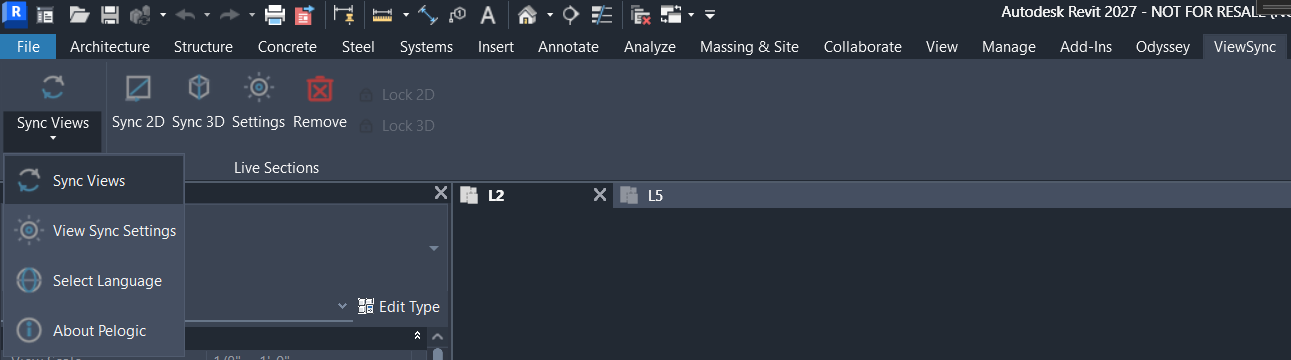
| Command | What it does |
|---|---|
| Sync Views (split-button main action) | Toggles global view synchronization ON/OFF. When enabled, ViewSync monitors the active view and propagates pan/zoom updates to other open views based on your Sync Settings. |
| View Sync Settings | Opens the main ViewSync Settings dialog (sync behavior, performance, About, and licensing panel). |
| Select Language | Opens the language selector dialog and saves the selected language to ViewSync settings. |
| About Pelogic | Opens the Pelogic website. |
| Sync 2D | Toggles Live 2D sections ON/OFF. When turning ON, ViewSync creates/recreates NS and EW live section views if needed and starts live section synchronization. |
| Sync 3D | Toggles the Live 3D section workflow ON/OFF. When turning ON, ViewSync creates the live 3D section view if needed, updates section-box sync, and triggers immediate sync. |
| Settings (in Live Sections panel) | Opens the Live Sections Settings dialog (2D/3D live-section templates and behavior). |
| Remove | Deletes current-user working live 2D/3D views and section guide lines, then turns off live 2D/3D modes and clears live lock states. |
| Lock 2D | Toggles live 2D zoom lock. With lock enabled, 2D live-section zoom is held while centering remains synchronized to the active plan. |
| Lock 3D | Toggles live 3D camera/zoom lock. With lock enabled, camera orientation and zoom scaling are held while centering remains synchronized. |
License behavior: Live-section features (Sync 2D, Sync 3D, Lock 2D, Lock 3D) are enabled only when Pro capability is active (paid Pro or active trial).
2) Live Sections Settings Dialog
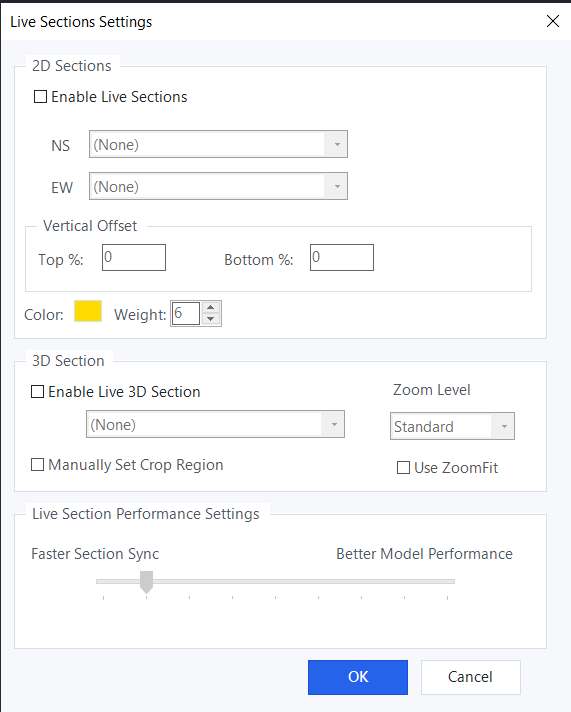
2D Sections
- Enable Live Sections: Turns live 2D section syncing on or off.
- NS and EW dropdowns: Select template/source views used when creating or recreating live 2D section views.
(None)means use default section creation behavior. - Vertical Offset — Top % / Bottom %: Expands the live section crop range above and below the plan view range by a percentage of the plan floor-to-ceiling height.
- Color and Weight: Controls the visual style of 2D live section guide/cut indicators (line color and line weight).
3D Section
- Enable Live 3D Section: Turns live 3D section behavior on or off.
- 3D template dropdown: Selects a template/source view for creating the live 3D section view.
(None)uses defaults. - Zoom Level: Stores the preferred live 3D zoom preset in settings.
- Manually Set Crop Region: Keeps the current 3D section-box vertical extents (Z range) instead of re-deriving them from plan top/bottom clip range.
- Use ZoomFit: Stores the live 3D zoom-fit preference in settings.
Live Section Performance Settings
- Faster Section Sync ↔ Better Model Performance: Sets the saved live-section responsiveness preference (left = more responsive, right = less frequent updates).
3) ViewSync Settings Dialog
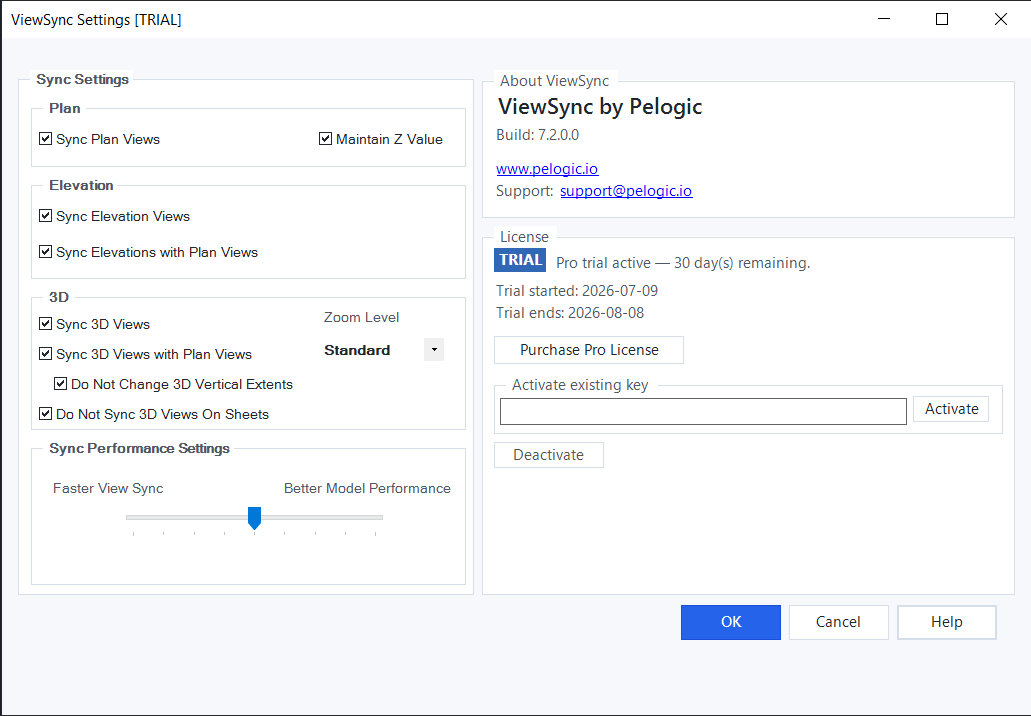
Sync Settings (left panel)
- Plan
- Sync Plan Views: Syncs plan-like open views to the active plan view.
- Maintain Z Value: Keeps each target plan's existing Z context when applying pan/zoom sync.
- Elevation
- Sync Elevation Views: Syncs open elevations with each other when elevation sync criteria match.
- Sync Elevations with Plan Views: Syncs elevation framing from active plan view range and extents.
- 3D
- Sync 3D Views: Enables general 3D view sync behavior.
- Sync 3D Views with Plan Views: Applies plan-driven framing/camera updates to open 3D views.
- Do Not Change 3D Vertical Extents: Prevents plan-driven 3D vertical extent adjustments where applicable.
- Do Not Sync 3D Views On Sheets: Excludes views currently placed on sheets from 3D sync updates.
- Zoom Level: Stores the 3D sync zoom preset in settings.
- Sync Performance Settings
- Faster View Sync ↔ Better Model Performance: Controls debounce delay for pan/zoom sync cycles. Lower values sync more quickly; higher values wait longer before applying updates.
About ViewSync (right panel, top)
- Shows product name and build number.
- Provides website and support links.
License (right panel, bottom)
- Status badge: Shows current tier (FREE, TRIAL, PRO).
- Status text: Shows current entitlement summary (for example, remaining trial days).
- Trial/Licensed details: Displays trial start/end dates or licensed customer/key summary.
- Purchase Pro License: Opens checkout URL.
- Activate existing key: Activates entered key.
- Deactivate: Deactivates paid license on this machine and returns to trial/free according to current entitlement state.
In Free mode, Pro-only sync features are automatically disabled in the settings UI.